Mitzie Rojas, MPH, RDN, LD, CPT
Email: mitzie.rojas@crc.gatech.edu
Nutrition Counseling
Georgia Tech's Registered Dietitian, Mitzie Rojas, is here to help students confidently navigate campus dining centers and make food choices that meet their individual needs. Mitzie can help you build a balanced meal, better understand the options available at each dining center, and identify appropriate choices for food allergies, sensitivities, and intolerances.
She also offers presentations and workshops for student groups. In addition, Mitzie partners with Campus Recreation as the dietitian for BeWell, their small group training program.
Q&A
Do your refried beans contain lard?
No, our refried beans do not contain lard.
Are your pasta sauces vegetarian?
Vegetarian and vegan options are available depending on the sauce. Please refer to on-site labeling for specific ingredient information.
Are your soups made with vegetable broth or stock?
Our soups are purchased and vary by day. Depending on the selection, soups may contain meat, be vegetarian, or be vegan. We offer two rotating soup options daily; however, at WV we are currently offering one soup while a replacement warmer is being ordered. Please refer to on-site labeling for ingredient and dietary information.
Is the pesto made on-site, and is it vegetarian?
The pesto is purchased and is vegetarian.
Do the frosting or sprinkles on baked goods contain gelatin?
Yes, the frosting and sprinkles used on our baked goods contain gelatin.
Which bean recipes contain lard, pork, bacon, or other non-vegetarian ingredients?
Bean, Black Cooked [IN] (0327871)
Bean, Black Cooked [MB] (0328166)
Bean, Cannellini Cooked (0327873)
Bean, Garbanzo Cooked (0327872)
Bean, Garbanzo Crispy [TK] (0329582)
Bean, Kidney Cooked (0327874)
Bean, Pinto [Special] (0349912)
Bean, Red [WB] (0330490)
Bean, Red Cooked [Special] (0349913)
Bean, White [MB] (0327523)
Beans Refried No Cheese [IN] (0323206)
Beans Refried No Cheese [TQ] (0319228)
Beans, Butter [MB] (0327520)
Beans, Garbanzo [MB] (0327517)
Beans, Garbanzo, Greek [WB] (0327578)
Beans, Greek Garbanzo (0323934)
Beans, Pinto [HM] (0317071)
Beans, Pinto [TQ] (0321814)
Beans, Spicy Coconut (0334802)
Beans, Tomato Stewed [VG] (0323239)
Beans, Tomato, Stewed [HM] (0314116)
Black Bean Burger [GL] (0320749)
Black Bean Corn Poblanos [TQ] (0321154)
Black Bean, Canned [SL] (0314182)
Black Beans, Canned [VG] (0322669)
Black Beans, Sweet Potatoes [TQ] (0339528)
Bolognese, Mushroom White Bean [VG] (0327534)
Casserole, Tamale Pie, Tomato, Bean [TQ] (0315288)
Chili, Black Bean Colorado [VG] (0323936)
Enchilada, Black Bean, Sweet Potato [VG] (0314023)
Mixture, White Bean (0319227)
Mushroom and Black Bean Fajita [TQ] (0315794)
Mushroom and Black Bean Fajita [VG] (0323051)
Mushroom and Black Bean for Fajitas [MB] (0320624)
Mushroom Black Bean Ropa Vieja [TQ] (0317190)
Mushroom, White Bean, Spinach Saute [MB] (0322745)
Mushroom, White Bean, Spinach Saute [PZ] (0321983)
Mushrooms and Black Beans for Fajitas [IN] (0315795)
Mushrooms and Black Beans for Fajitas [TQ] (0320623)
Red Beans [MB] (0316724)
Red Beans [VG] (0323008)
Rice, Black Bean, Green Pepper [HM] (0313976)
Rice, Black Bean, Green Pepper [VG] (0323260)
Soup, Black Bean (0314132)
Stir Fry Black Bean and Veggie [VG] (0315993)
Succotash Corn and Lima Bean [TQ] (0315818)
Succotash, Corn and Lima Bean [HM] (0320615)
Succotash, Corn and Lima Bean [VG] (0323563)
Vegan Chorizo Black Bean Scramble [HM] (0323547)

Elevate your dining experience this semester by using the Nutrislice app. Easily explore our school's menus, identify allergens, and tailor your meals to specific dietary needs. With up-to-date information on ingredients and nutrition, the Nutrislice app ensures a seamless and informed dining journey for students and parents alike.
Click the photo above to access the website, or click the relevant application store icon below to download it on your Apple or Android device.


(text and background only visible when logged in)
A Guide to Navigating Dietary Needs
Are you navigating campus dining with allergies or special dietary needs? Tech Dining has your back. Review the brochure below and if you have any questions, please reach out to the Tech Dining staff (on-site in any dining facility) or contact Tech Dining's Registered Dietitians below.
(text and background only visible when logged in)
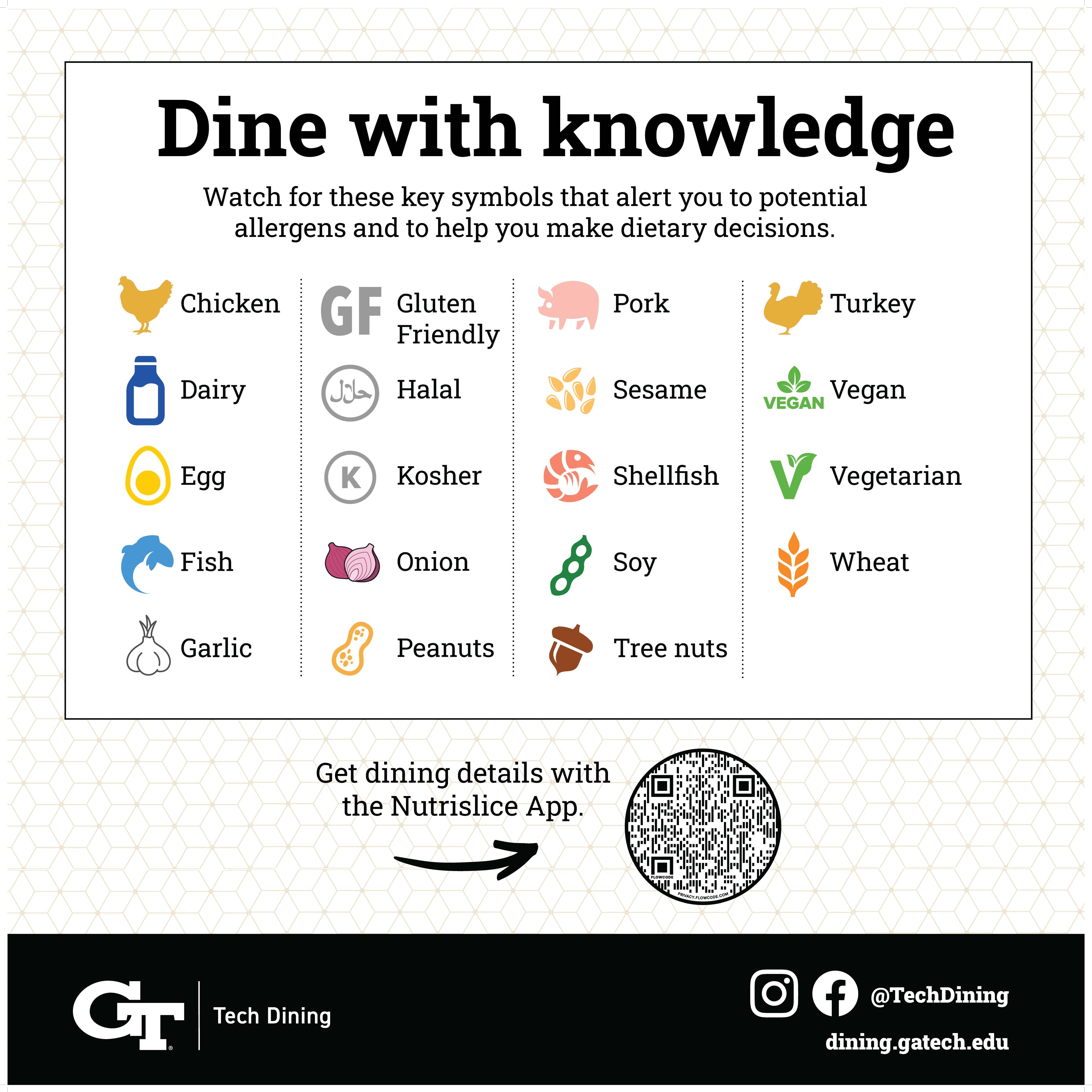
Allergen Icons
Tech Dining makes it easy to identify ingredients and potential allergens. Look for these symbols when dining with us. You can always ask a staff member if you have any questions.